
GoHighLevel Account Audit: What We Find In Broken Accounts
A GoHighLevel account can look healthy and still be failing the people it was built for. On Nov 4, 2026 we scanned the 16 active accounts in our care. Out of 464 published automations, 33 had no way to start on their own, and 11 had a step pointing at something no longer in the account. Every one of them said Published.
That is the pattern this lesson is about. A full GoHighLevel account audit follows the path a lead takes, so below is how a working account should flow, what we counted, which faults can cost you leads, which ones only look bad, a checklist you can run in your own account today, how to prove a fix worked and what it takes to keep it working. Create Assistants builds and manages GoHighLevel accounts, so we read these accounts for a living. No client is named here, and every number is a total across accounts.
Why Do Owners Come To Us With A Broken GoHighLevel Account?
We went through our team's written notes on 160 sales calls held between Apr 24, 2026 and Oct 23, 2026. By our count, 44 of those owners already had a GoHighLevel account that was broken, messy or stalled. In 30 of those 44, the notes say someone else built it: an agency, a freelancer, a virtual assistant or a white label provider. Another 14 owners had an account they barely used, or never used at all.
Owners rarely open with "my automation has a dead step." They describe what it does to their business. These all came from different calls:
- A calendar that does not book.
- Cancelled prospects who still get event reminders.
- A STOP reply that ends the texts but not the email sequence.
- A payment connection that dropped, so sales were not being paid out.
- Leads that never reach the pipeline.
It would be easy to blame the last builder and stop there, but that misses how this happens. Accounts drift, including the ones we look after. Somebody renames a tag, deletes a pipeline or retires an automation, and whatever pointed at it gets left behind, still marked Published.
How Should A Working GoHighLevel Account Flow?
Before you look for faults, know what working looks like. A working account takes one person from first contact to a deal somebody owns, and every stage leans on something that can change without warning. This is the path we read an account by, with the check further down that tests each stage.
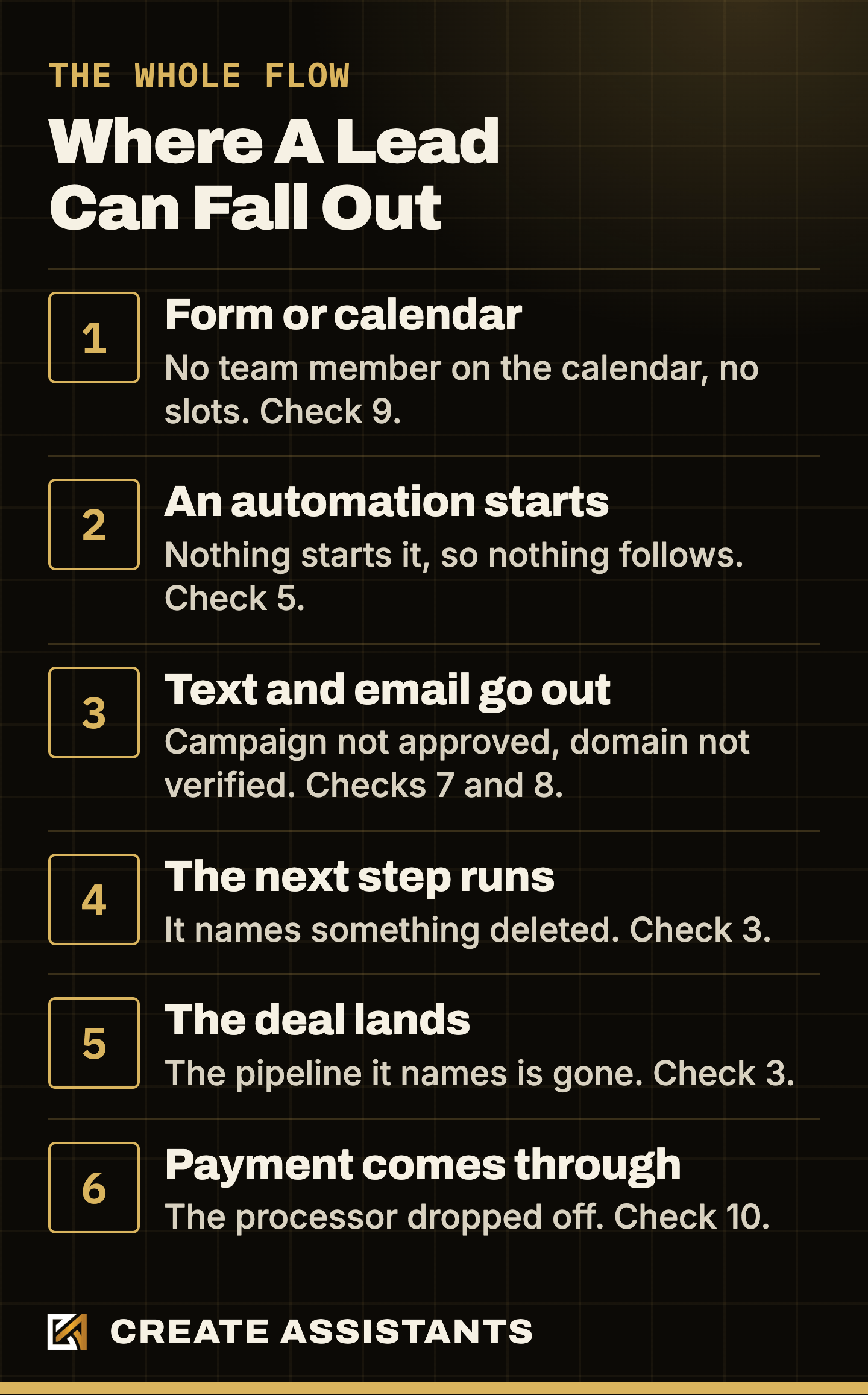
Two things make this path hard to read from the outside. A stage can fail while the automation above it still says Published. And what you notice is rarely where it broke: a lead who never got a text might be a campaign that was never approved, a step aimed at something deleted, or an automation nothing started. That is our reason for walking the path in order, instead of starting with a list of tags.
What Did We Find Across 16 Live Accounts?
Our scan reads the automations, tags, custom fields, forms, pipelines and email templates in an account. These are the totals as they stood on Nov 4, 2026, before any fixes. We rechecked flagged items against the live accounts before publishing, because our first automated count was too high.
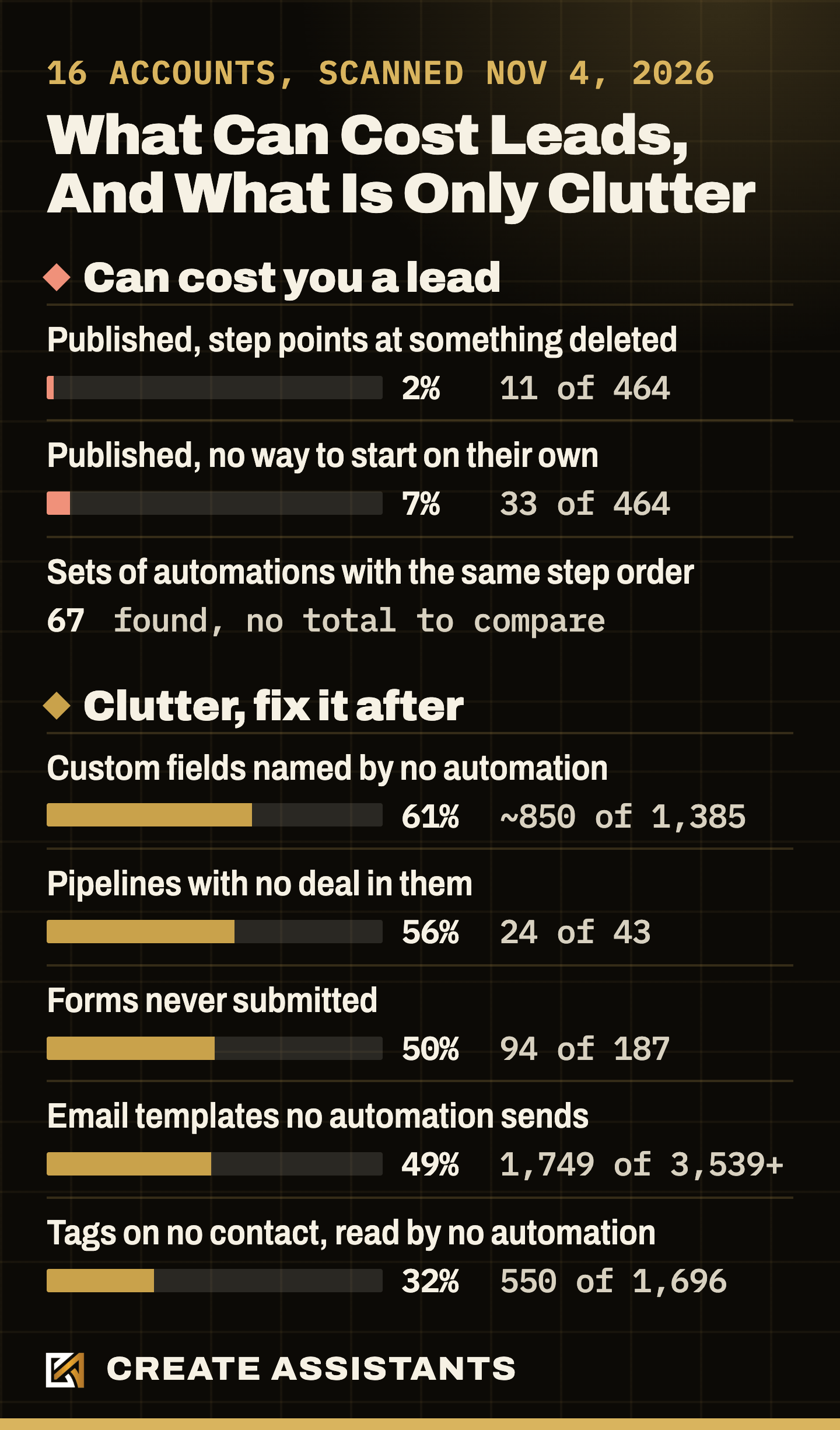
See every count, and how many accounts had each
| What we counted | Count | Accounts with at least one |
|---|---|---|
| Automations with a step pointing at something deleted (draft or published) | Count: 118 of 1,167 | Accounts with one: 15 of 16 |
| Published automations with that same fault | Count: 11 of 464 | Accounts with one: 4 of 14 |
| Published automations with no way to start on their own | Count: 33 of 464 | Accounts with one: 8 of 14 |
| Sets of automations with the same order of step types | Count: 67 | Accounts with one: 16 of 16 |
| Tags on no contact and read by no automation | Count: 550 of 1,696 | Accounts with one: 16 of 16 |
| Custom fields named by no automation, live or draft | Count: About 850 of 1,385 | Accounts with one: 16 of 16 |
| Forms that have never had a submission | Count: 94 of 187 | Accounts with one: 16 of 16 |
| Pipelines with no deal in them, open, won or lost | Count: 24 of 43 | Accounts with one: 13 of 16 |
| Email templates no automation sends | Count: 1,749 of 3,539+ | Accounts with one: 16 of 16 |
Read these for what they are. These are the accounts in our care, not a survey of the platform, and several of them are new, so the clutter rows include starter material nobody has switched on yet. Two accounts had no published automations on the day we scanned, which is why the published rows in the full table say 14. In one account we could not recheck its 10 never submitted forms, or the contact counts behind its unused tags, so those rest on the scan alone. Take these numbers as a map of what is common, not as an industry rate.
Which GoHighLevel Faults Can Actually Cost You Leads?
Three of those counts can cost you a lead. Check these first.
Steps That Point At Something Deleted
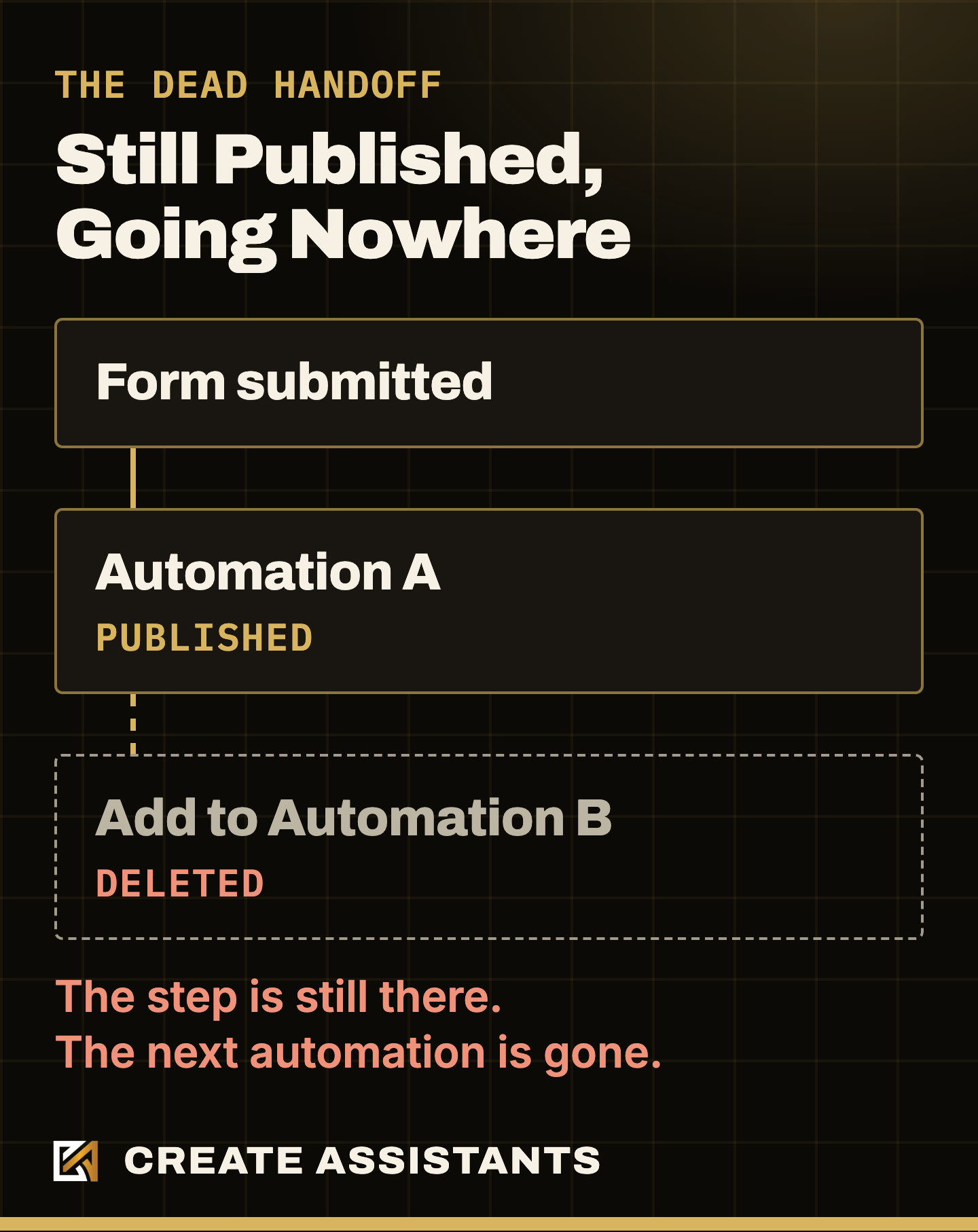
Inside the 11 published automations with this fault, we counted 18 dead references. The most common by far was a deleted tag (14), then a deleted pipeline (3), then a handoff to an automation that has been deleted (1). The tag number is the one to read with care. A Remove Tag step aimed at a deleted tag simply has nothing to remove.
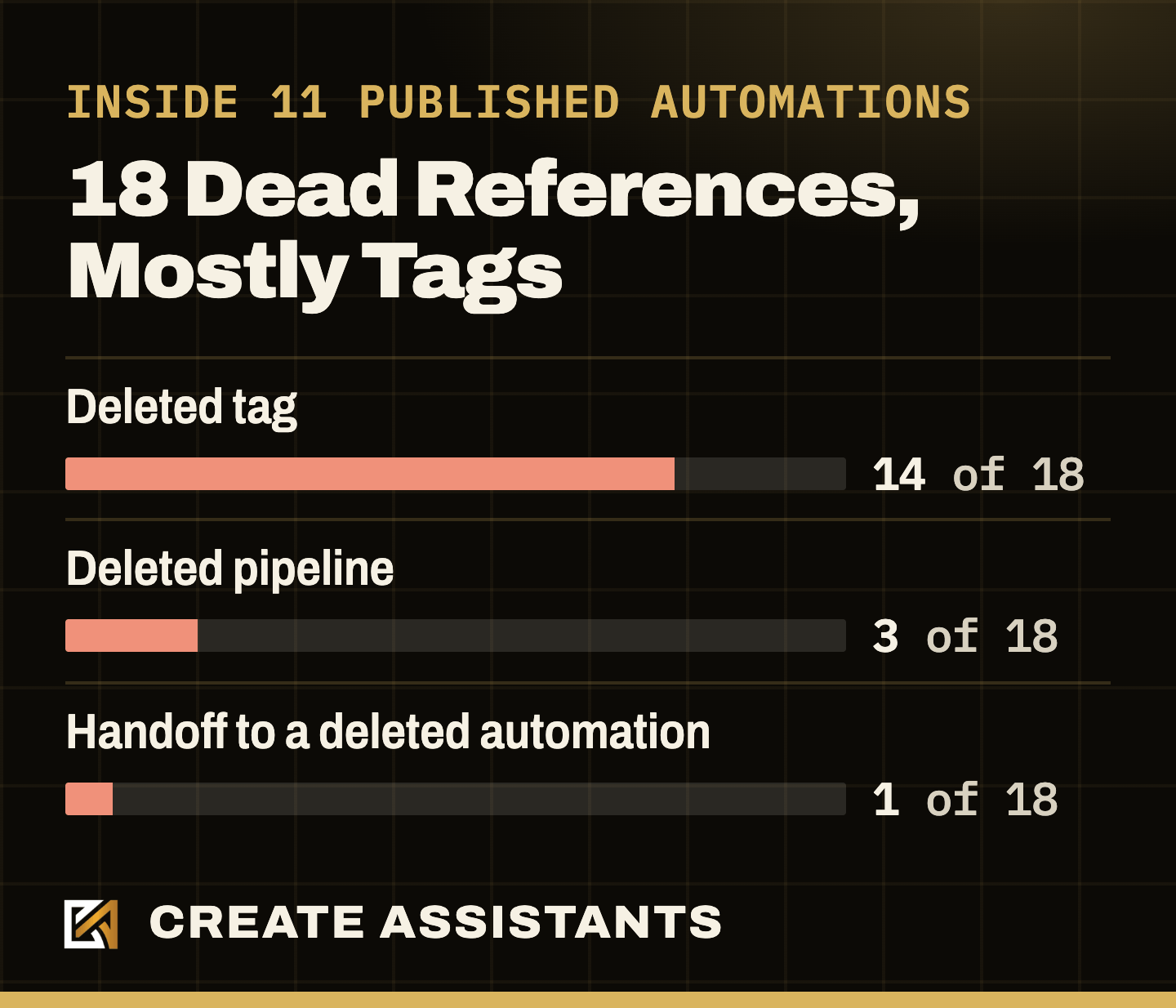
Worry about the steps with real work to do. The clearest break we found was a Create Opportunity step aimed at a pipeline that no longer exists. The step still sits in the automation, the automation still says Published, and the pipeline it names is gone. Look for those first.
Published Automations With No Way To Start
Published means an automation is allowed to work. It does not mean anything will ever start it. We found 33 with no way to begin on their own: no trigger, and no other automation adding anyone to them. Some are deliberate, like a one time push you start by hand, and a funnel or an offer could start others in ways we did not trace. Any you cannot explain may be follow up you believe you have and do not.
Two Automations Doing One Job
We found 67 sets of automations with the same order of step types. Same order does not mean same content, and we did not compare what the steps say, so treat this as a place to look, not a count of duplicates. Only 25 of the 67 sets have two or more live members. Some of those are deliberate, like one copy per event or offer. The ones to check are copies nobody meant to keep, like a replacement built without switching the first one off. Two live automations doing one job can send one lead the same message twice.
What Looks Bad But Is Not Urgent?
The rest of the counts are clutter. It makes an account hard to work in, and it does not lose you a lead this afternoon.
- Drafts. 703 of the 1,167 automations were drafts. A draft does not run. The risk is someone publishing the wrong one.
- Tags. About one in three (550 of 1,696) was on no contact and read by no automation. The largest account held 726 tags.
- Custom fields. About 850 of 1,385 were named by no automation, live or draft. That is not the same as useless, as the next section explains.
- Forms and templates. About half the forms had never had a submission, and about half the email templates (1,749 of at least 3,539) were sent by no automation.
Clean this up after the faults above, never before. An owner who spends a weekend deleting tags while leads still cannot reach the pipeline has an account that looks better and works the same.
Why Should You Not Start By Deleting Things?
"Unused" is a measurement, not permission. A custom field no automation reads can still hold data a form collected or an outside system wrote. A tag on nobody today may be the trigger for something that fires next month. HighLevel's own guidance on tags says to review workflows, Smart Lists, filters and integrations before you rename or delete an established tag. HighLevel also documents a Workflow Maps check for where a tag, form, calendar or pipeline is used. We did not see that view in our own account on Nov 5, 2026, and HighLevel says it covers workflow dependencies only, so an empty list there would not prove an item is unused elsewhere.
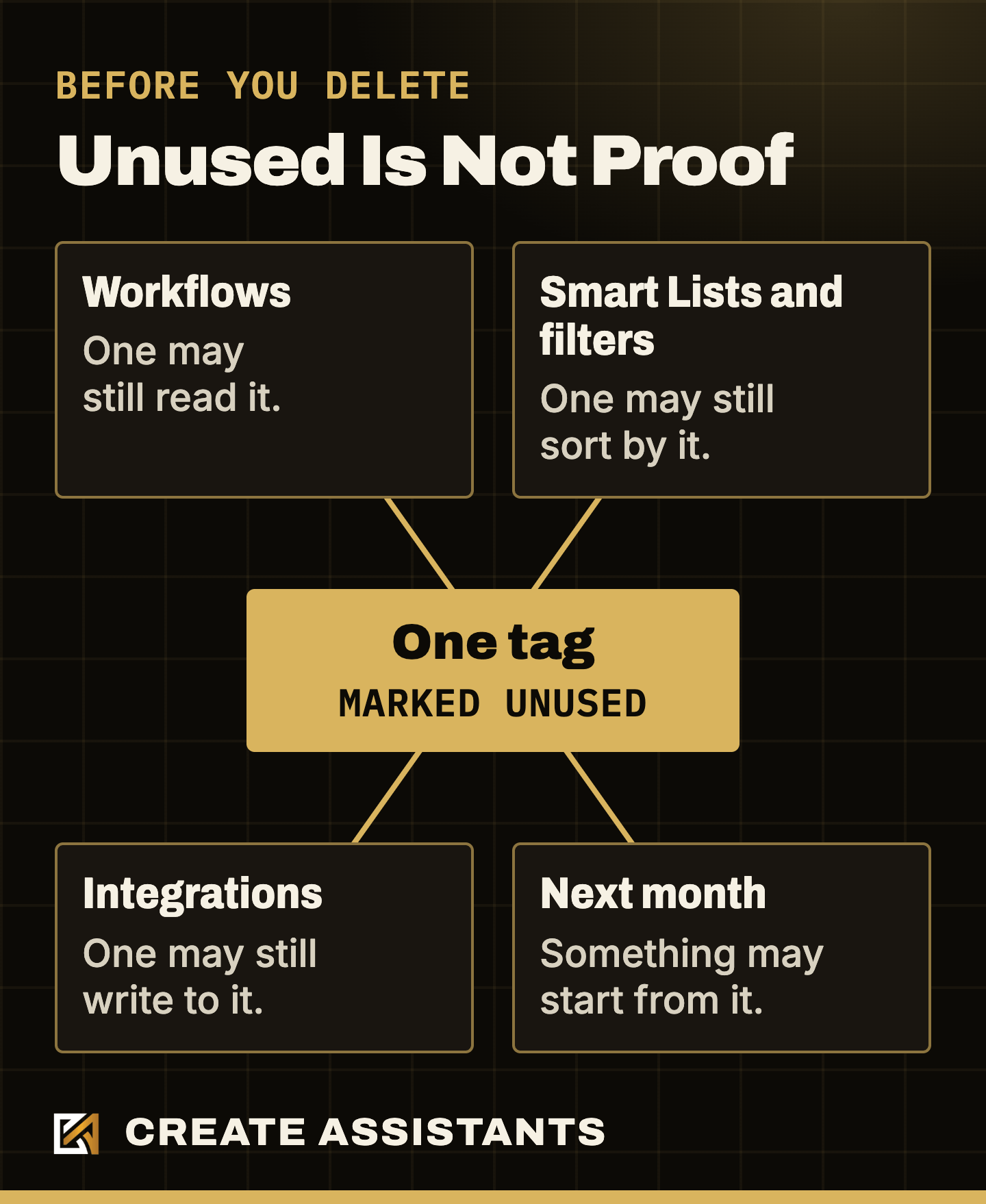
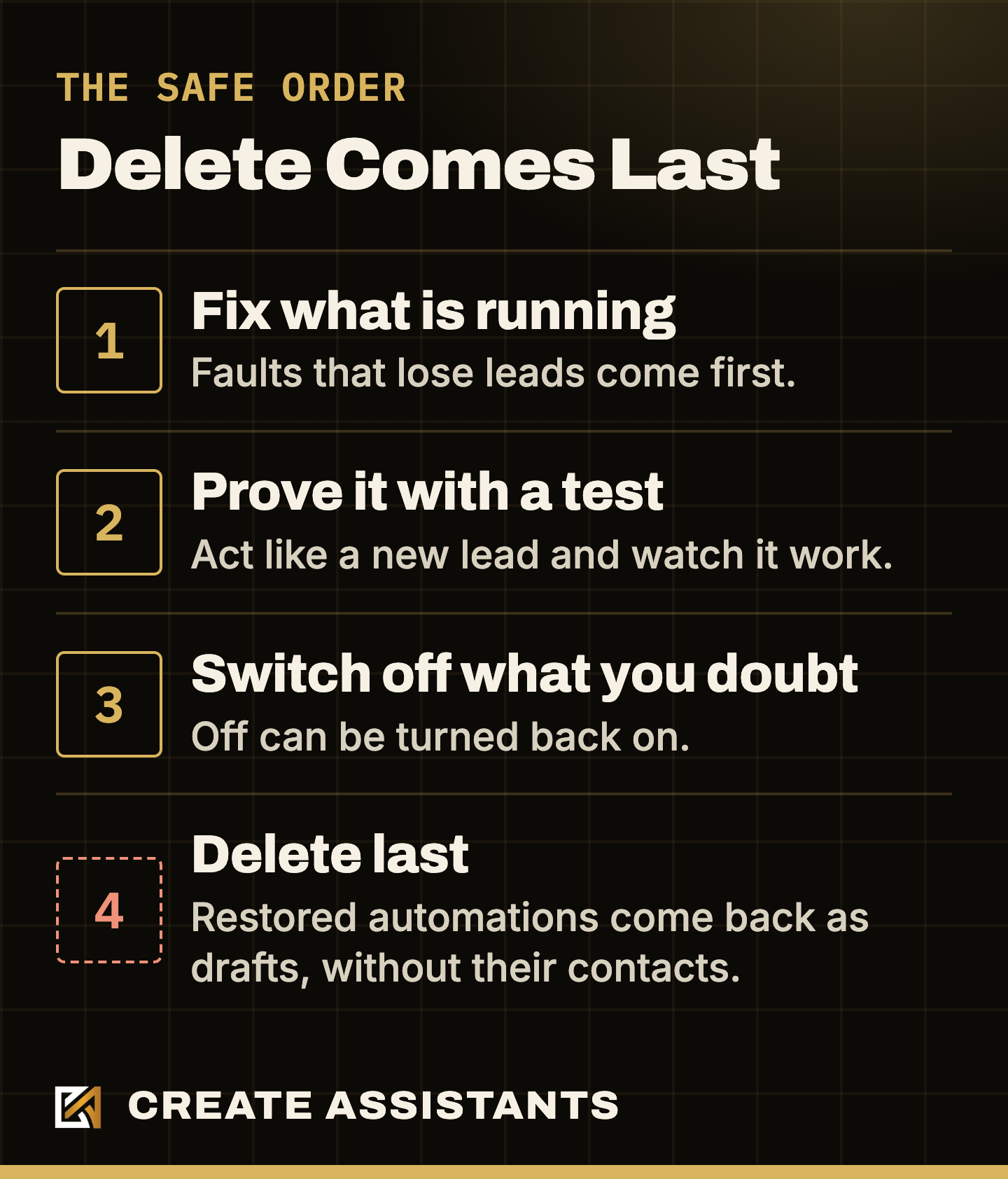
Deleted automations are also harder to bring back than most owners expect. HighLevel keeps them in a Deleted tab for 90 days, but a restored workflow returns as a Draft, and the contacts who were inside it do not come back with it.
Our own first count shows why you check before you act. It flagged email steps as pointing at missing templates, and when we opened those templates directly, 94 of them were there all along. They simply had not appeared in the template listing our scan reads, which is also why our template total is a minimum. If a step looks like it has lost its email, open the template itself before you call it missing.
Our rule on the accounts we manage is that nothing is removed until the client approves it, item by item.
GoHighLevel Account Audit Checklist: 13 Checks To Run Today
Run these in order. Menu names come from HighLevel's help docs and our own account as of Nov 5, 2026. Your agency's setup may show some of them differently.
Free guide: the GoHighLevel Account Audit Checklist. All 13 checks below on two printable pages, with a box to tick beside each one, for you or whoever manages your account. No form to fill in and no email needed.
Everything starts with check 1, so here is the test itself.
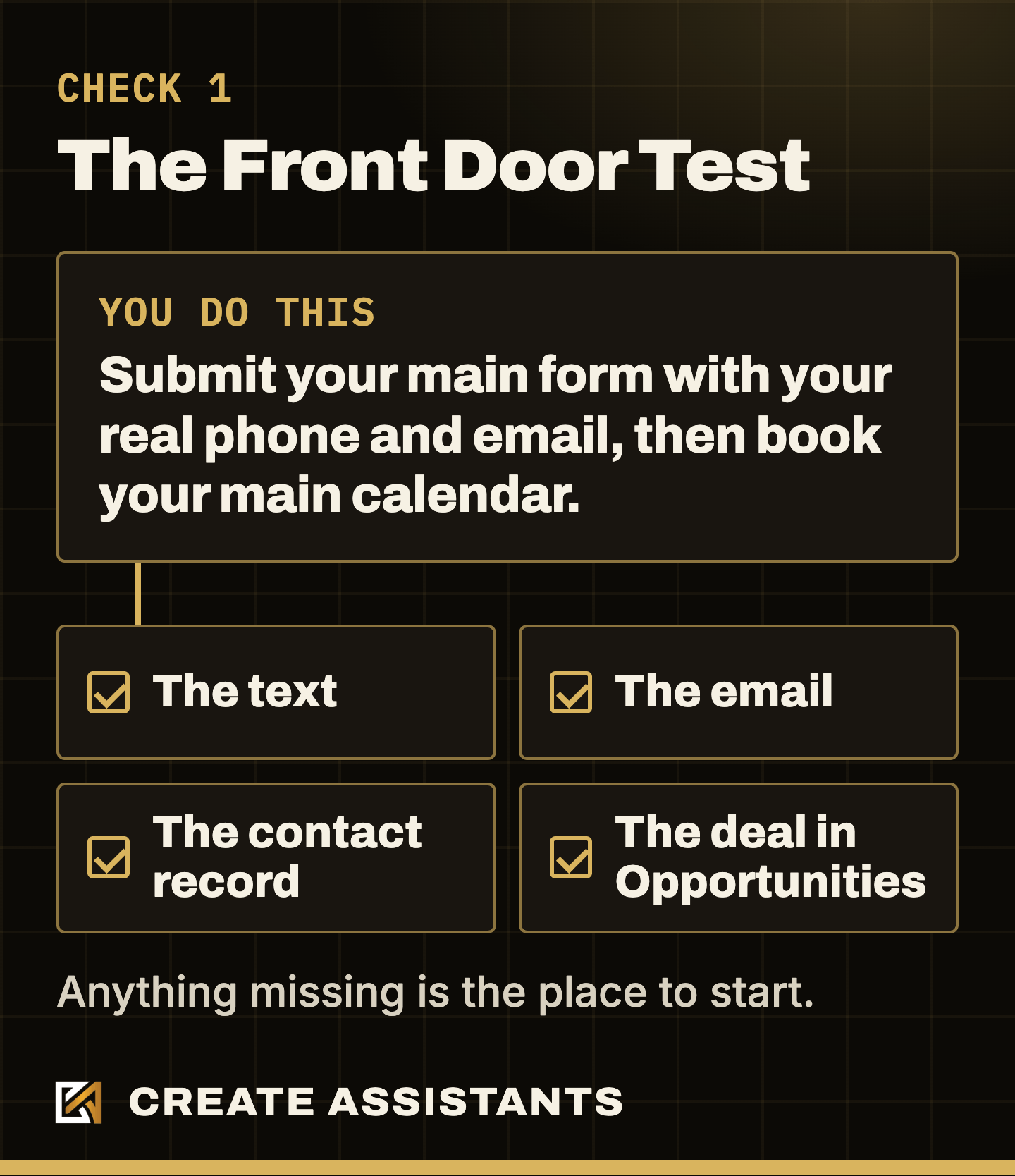
- Go through your own front door. Submit your main website form with your real phone and email, then book on your main calendar. Confirm that the text, the email, the contact record and the deal in Opportunities all appear. This one test finds more than any report.
- Read what just ran. In Automation > Workflows, open the automation that fired and check its Execution Logs and Enrollment History. Execution Logs shows each action, its status and any error. Enrollment History shows why the contact left.
- Walk the handoffs. On every published automation you rely on, open each step that names another automation, a pipeline, a stage or a tag. Confirm that thing still exists.
- Open Needs review. Go to Automation > Workflows, the Needs review tab. It lists workflows with errors in the past 30 days which are not resolved.
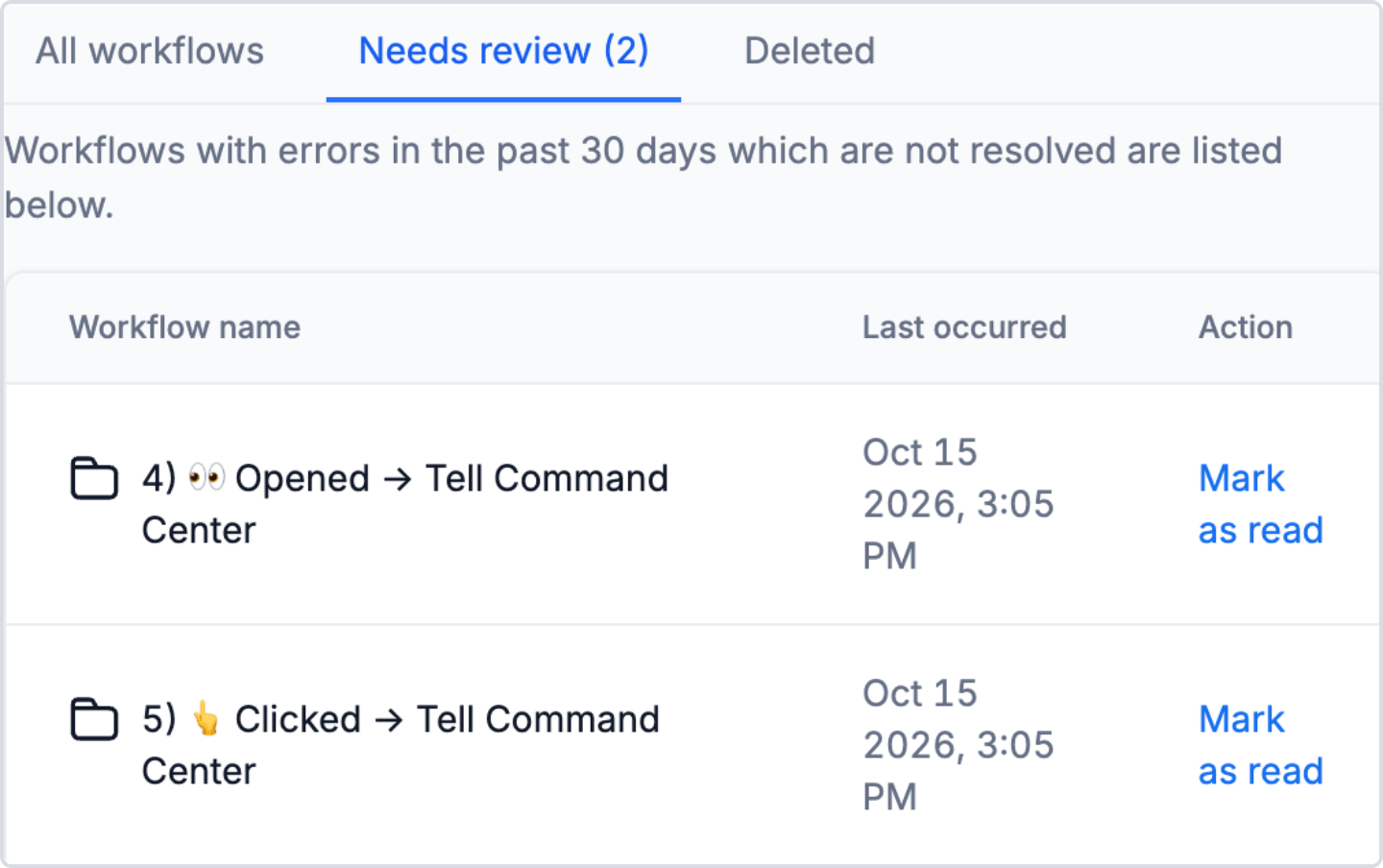
A note on this check. HighLevel documents a fuller view called Workflow Maps, limited at launch to agency users and agency admins. We did not see it in our own account on Nov 5, 2026, so ask your agency if you want it. Mark as read fixes nothing: HighLevel's help says it does not repair the workflow or retry the failed execution. HighLevel describes these as errors from recent runs, so an automation nothing starts should not show.
- Question every published automation. For each one, ask what starts it and when it last ran. If you cannot answer, write it down for the last check.
- Test the emails in your main sequence. Send each one to yourself, or open it in Marketing > Emails > Templates. Confirm that the template exists, the links go to the right place and the unsubscribe link works.
Those six test what your automations do. The next seven test what they lean on, and you will not see any of it by opening the automation.
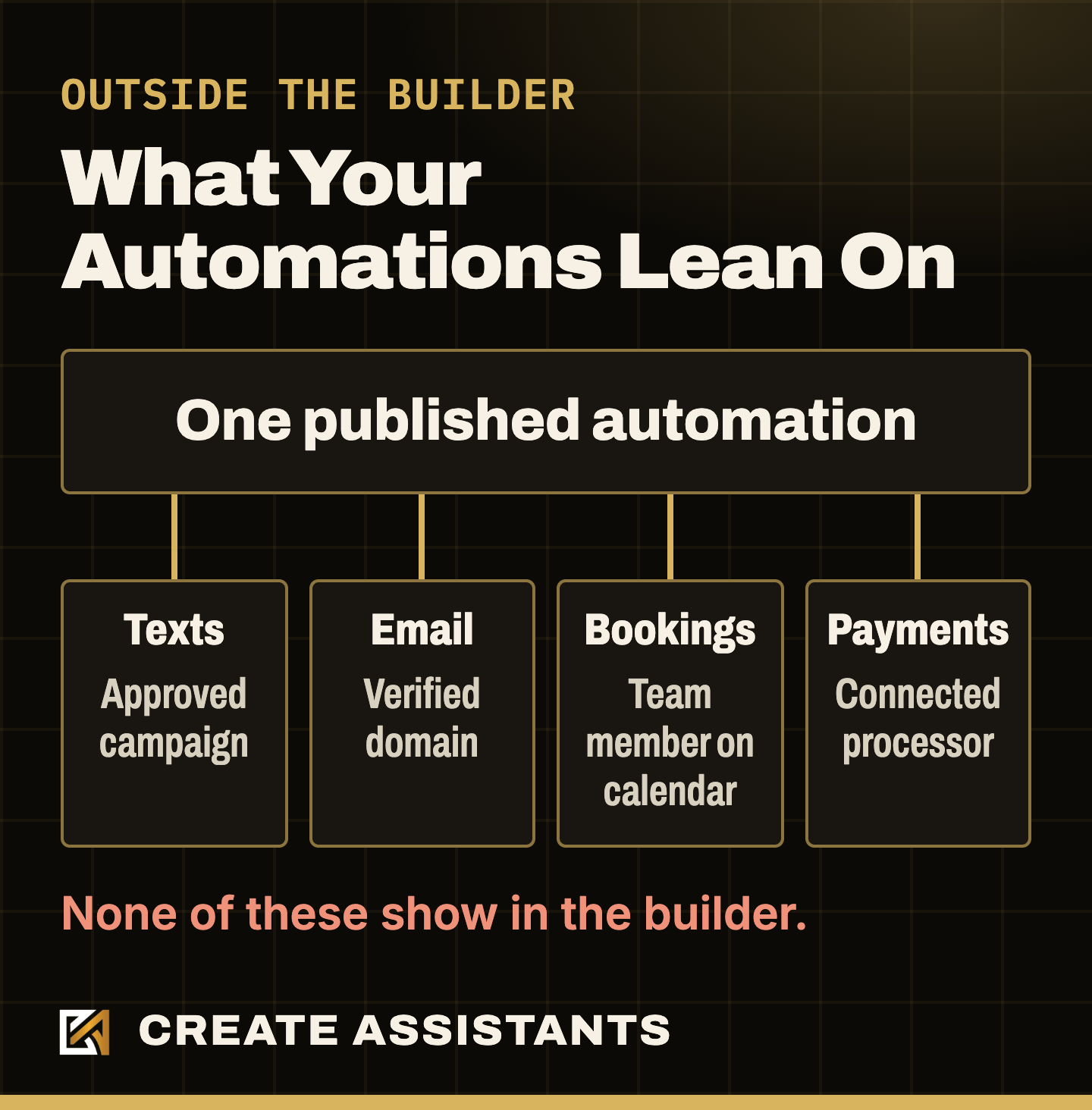
- Check your texting registration. Go to Settings > Phone System > Trust Center, open Brands & Campaigns, then the Campaigns tab. You want Approved. On a rejected campaign, click View required fixes.
- Check your email domain. In Settings > Email Services > Dedicated Domain and IP, confirm that your sending domain is verified.
- Check every calendar on your site. In Calendars, confirm each one has a team member assigned. No team member means no slots, so a visitor has nothing to book.
- Check your payment connection. In Payments > Integrations, confirm your processor still shows as connected.
- Open your privacy and terms pages in a browser. We have found these returning a 404 after a funnel was removed, with consent boxes still linking to them. Twilio's rule for registering a texting campaign, posted Apr 6, 2026, requires both links to be valid and public.
- Read your user list. In Settings > Users, remove anyone who no longer works with you. We have found placeholder users sitting in accounts with full admin access, carried in by a snapshot.
- Now list the clutter, without deleting it. Go through the Tags page, Settings > Custom Fields, Settings > Custom Values, Sites > Forms and Opportunities > Pipelines. Mark each item keep, merge, switch off or remove, and look hard at any custom value that is blank.
Some of this may sit behind your agency's access. If it does, send this to whoever manages your account.
Copy this to whoever manages your account
Hey, I am auditing our GoHighLevel account. Can you send me what the Needs review tab under Automation > Workflows shows today? I also need to know what starts each published automation and when it last ran. Thank you.
That is 13 checks, and any one of them can open a longer job. If you would rather hand it off, we build and manage GoHighLevel accounts every month. Bring what you found to the call.
How Do You Prove A GoHighLevel Fix Worked?
A fix is not finished when the step looks right. It is finished when a new lead goes through and you can read the result. After every change, repeat the front door test, then read three places.
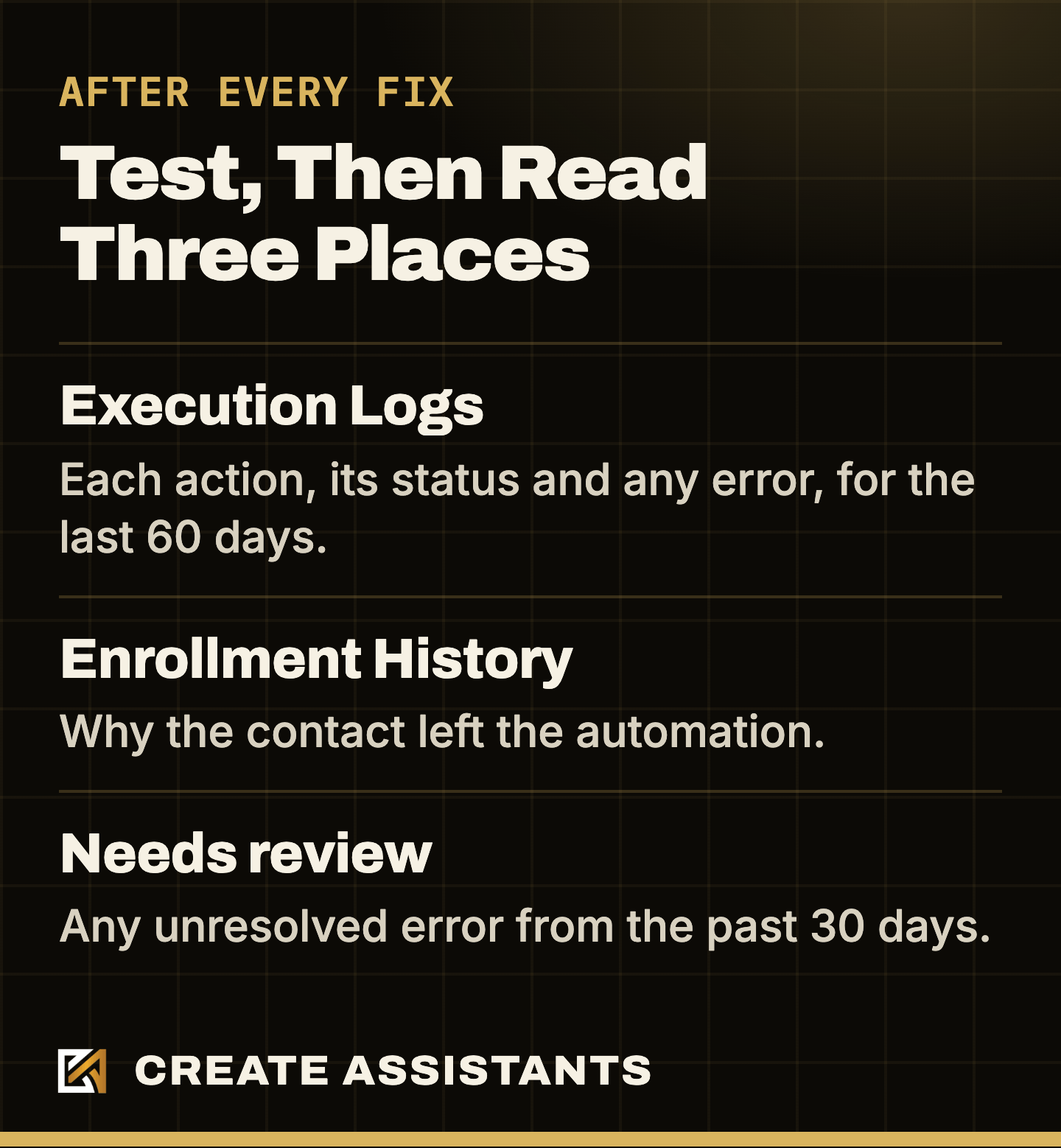
Execution Logs highlights a status when an action errors, and in our own account on Nov 5, 2026 the tab said logs are available for the last 60 days. Enrollment History gives the reason a contact left, in words like Workflow Completed or Removed by Workflow Action. The Needs review tab shows whether a workflow still has an unresolved error. If your agency gives you Workflow Maps, HighLevel documents a Contacts view there that traces one contact across workflows. We did not see it in our own account on that date.
Test The Way Out Too
Two of the complaints at the top of this post were about the way out, so test that as well. Cancel the booking you just made and confirm the reminders stop. Then reply STOP from your test phone, confirm the texts stop, and look at whether your email sequence keeps going. If it does, decide whether that is what you want.
Two Traps In Your Own Test
- Testing twice on one contact. In a workflow's settings, Allow re-entry decides whether a contact can come back after leaving, and a contact still enrolled gets skipped. We read that on our own builder screen on Nov 4, 2026. A second test can look like a fault when it is only that setting, so use a phone and email the account has not seen.
- Testing STOP on your real phone. HighLevel's messaging policy says a permanent DND cannot be removed from the screen. The contact has to reply START, YES or UNSTOP. Reply START when you finish, or your own number stays blocked in that account.
Should You Repair Your Account Or Rebuild It?
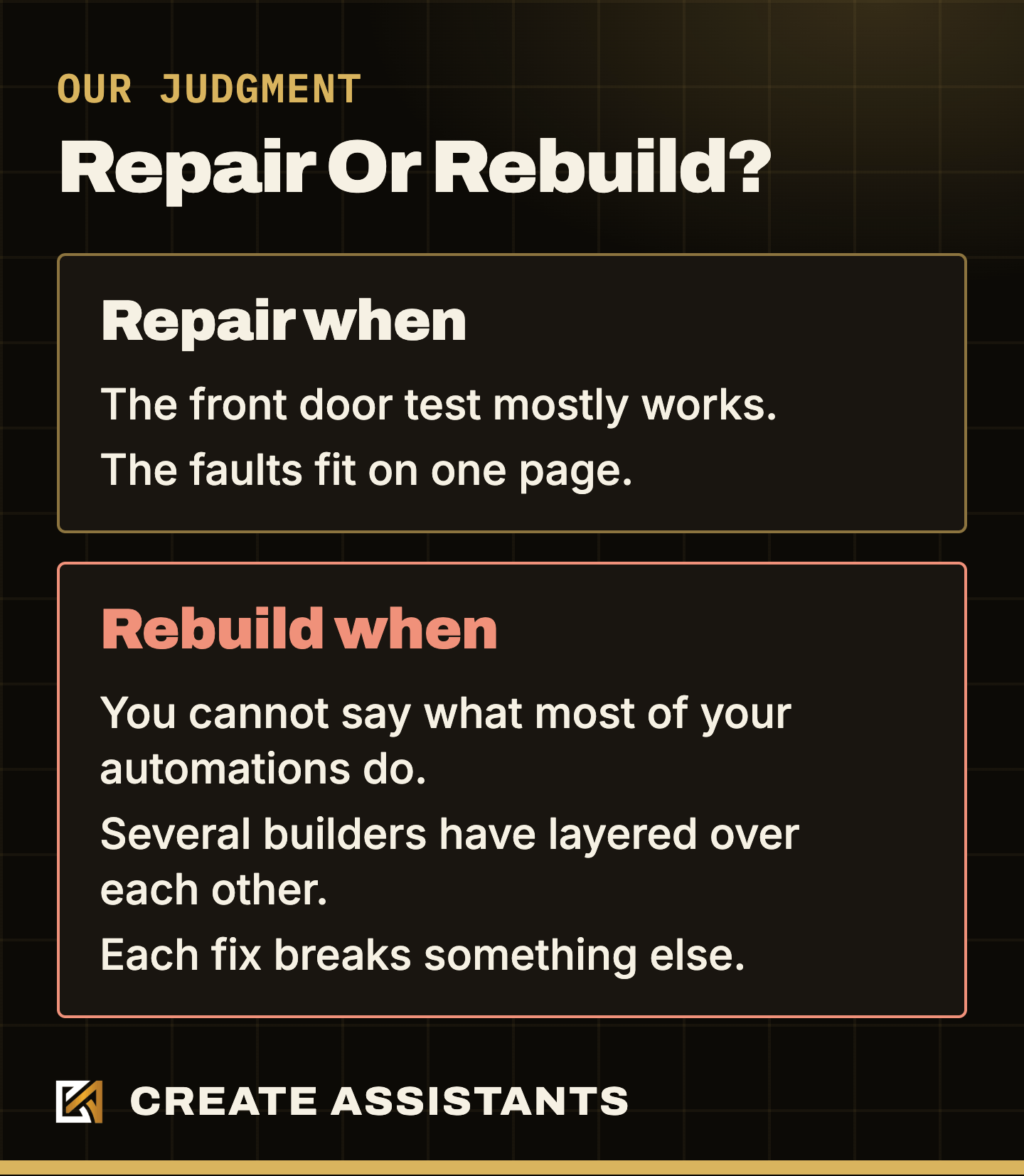
This is our judgment from reading these accounts, not a formula.
What Does It Take To Keep A GoHighLevel Account Working?
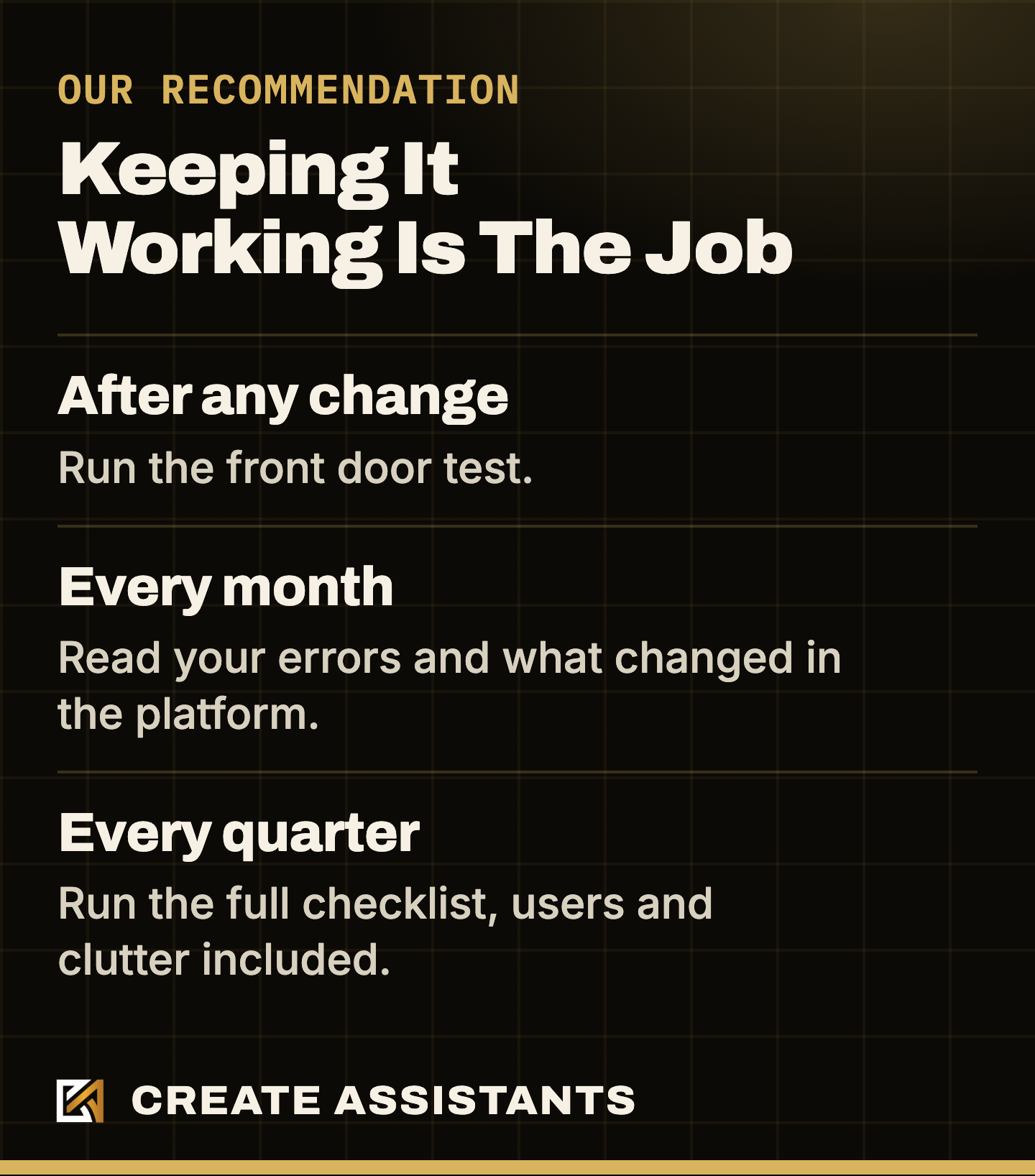
An audit is a picture of one day. The next day someone renames a tag or retires an automation, and whatever pointed at it gets left behind. Building an account is a project. Keeping it working is the job. This is the rhythm we recommend, and it is our judgment, not HighLevel's.
The platform moves too. Things change in it every month, and we track the changes in our monthly GoHighLevel report.
That rhythm needs one person who understands GoHighLevel and has the hours. If that is you, you now have the list. If whoever built yours is gone, or you have no time for this, hand it to us. Create Assistants is a GoHighLevel management company. We build your whole account fully custom to your business, then manage it every month. We counted these faults in the accounts we manage and showed you the totals, because finding them is part of the job. When something breaks or needs changing, you message us and we fix it. Book a call and bring your checklist.
GoHighLevel Account Audit FAQ
What does a GoHighLevel account audit check?
It follows the path a lead takes: your form and calendar, what starts each automation, what each step points at, your texting registration, your email domain, your payment connection, who has access, and only then the clutter.
Why does my GoHighLevel workflow say Published but nothing happens?
Published only means the automation is allowed to work. Something still has to start it, and each step needs what it points at to exist. Check the trigger first, then the Execution Logs, then every step that names another automation, pipeline, stage or tag.
How can I tell if my GoHighLevel account is broken?
Act like a new lead. Submit your own form with your real phone and email, book on your calendar, and confirm that the text, the email, the contact record and the deal all appear. Anything missing is the place to start.
Is it safe to delete unused tags and custom fields in GoHighLevel?
Not until you have checked what depends on them. A tag or field can be used by a Smart List, a form, a filter or an outside integration even when no automation reads it. Make a list, review it, and delete last.
Do draft workflows cause problems in GoHighLevel?
A draft does not run, so it cannot send anything. The cost is confusion: in our scan, 703 of 1,167 automations were drafts, and the more of them you have, the easier it is to publish the wrong one.
Should I repair or rebuild my GoHighLevel account?
Our judgment: repair it when your front door test mostly works and the faults fit on one page. Rebuild when you cannot say what most of your automations do, when several builders have layered over each other, or when each fix breaks something else.
How often should I audit my GoHighLevel account?
Run the front door test whenever someone changes your tags, pipelines, forms or automations, because that is when things disconnect. Our recommendation is to read your errors every month and run the full checklist every quarter.
Can a GoHighLevel agency audit and fix my account for me?
Yes. Create Assistants is a GoHighLevel agency that builds and manages accounts. Book a call and we will look at what you have and tell you what we would fix first.